 printCAD
Surface textures
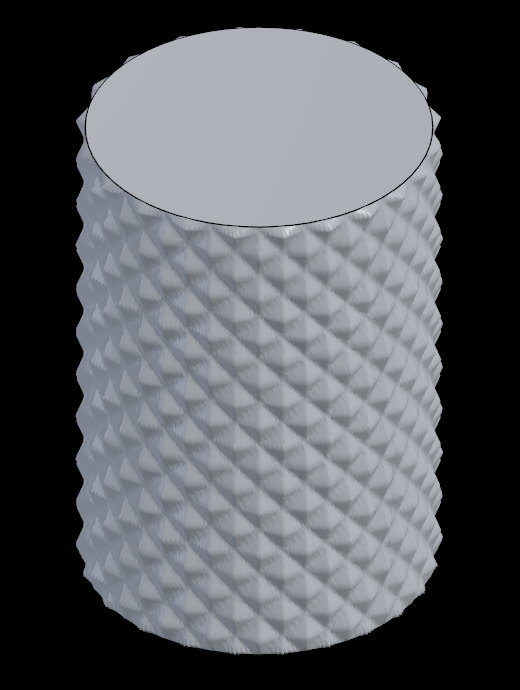
A surface texture presses a pattern into a body's faces for printing: knurling on a grip, ribs, hexagons, a rough finish, or a picture of your own. The exact solid stays as it is. The texture is drawn in the view and pressed into the STL and 3MF files you export and the file sent to the slicer. STEP export writes the solid without it.
Adding one
Right click a body (in the tree or the view) and pick Surface texture…. The texture starts on the face under the pointer and every face selected in the view (Ctrl+click picks several); with none, on the whole body. A new texture is Knurl, Triplanar, a 3 mm tile, 0.4 mm deep. The task in the right panel shows the changes in the view as you make them. Done keeps them as one undo step, Cancel puts back what was there.
- Faces: click faces in the view to add them, Ctrl+click for several at once. Each listed face has a × to leave it smooth again. Whole body textures every face.
- Pattern: pick one from the gallery, or Picture… for a greyscale PNG or JPEG, white standing highest. The picture is kept in the document.
- Projection: how the flat pattern is laid on the
faces, along the body's own axes.
- Triplanar blends three flat projections and suits any shape.
- Flat along X, Y or Z projects straight along one axis.
- Round X, Y or Z wraps the pattern round an axis, a whole number of tiles round, so it closes without a seam: knurling on a cylinder.
- Spherical wraps round the middle of the textured faces.
- Tile: the size of one repeat of the pattern (0.2 to 500 mm).
- Turn: the pattern's rotation on the surface.
- Depth: how far the pattern's high points stand from the surface (up to 20 mm). Into the surface cuts it in instead.
- Keep flat: faces within this angle (up to 89°) of facing straight up or down the body's Z stay smooth, a print's top and the side it stands on. 0 textures them too.
A body can carry several textures on different faces: Add starts another, and the Texture 1, Texture 2 labels switch between them. Remove this texture takes the one shown away. A textured body shows TEXTURED in the tree.
The texture follows its faces through edits: faces are kept by the names the model gives them, so changing a pad's length keeps the grip knurled.
Copies
A linked copy, and every copy an array makes (a component array's too), carries its original's textures: it is drawn, exported, sent to the slicer and laid out for printing textured as the original is, and follows every change to them. A mirrored copy's texture is the mirror image of the original's. Copies that look alike share one textured mesh in the view, so a long array costs little more than one part.
A copy can be given textures of its own: Surface texture… on a copy opens on its original's, and once you change them they are the copy's alone, used in place of the original's from then on. A copy whose own textures are taken away follows its original again.
Exporting
The export dialog's Surface textures switch (on by default, for STL and 3MF) presses them in. The exported mesh is finer than the view's, and capped at a few million triangles for very fine patterns on large parts. Send to slicer always includes them.
Scripts
pc.doc.set_textures{body = b, textures = {...}} sets all
of a body's textures at once; see the command reference in
SCRIPTING.md. Each entry's faces lists face
numbers as doc.faces gives them; without it the texture
covers the whole body, and an empty textures list takes
them all away.
pc.doc.set_textures{body = b, textures = {
  {texture = {pattern = "Knurl", projection = {Cylindrical = "Z"},
              tile_mm = 4, depth_mm = 0.8, keep_flat_deg = 10}},
}}